
Overview
Spark is a shared database system to process queries from members including complaints.
Each query is held in a single form. Updates, status change and notes are added to the form as the query is processed.
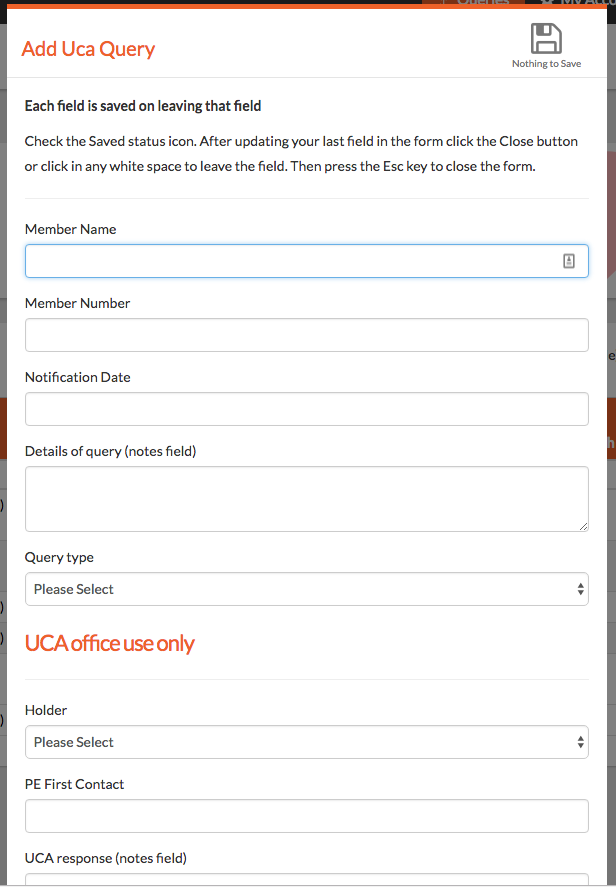
Adding queries
Members or the UCA team can add a query.
Viewing queries
Members can view any queries they have added
The UCA team can view all queries
Updating queries
Members can update any field in the submission section of the form
The UCA team can update all fields including those in the Office use only section.
Members can see selected fields in the Office Use Only section but cannot update them
Field key
- Notification Date - Date first entered
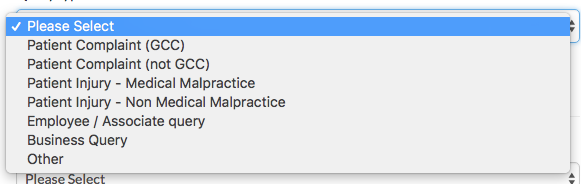
- Query type - See List
- Holder - PE Team / Insurer / Head Office
- PE First Contact - Date of first contact with PE Team to show elapsed time from first contact.
- UCA response (notes field) - All key decisions and notes on the case
- Status -

- Action pending - Name of UCA staff Member - eg John to review notes
- Action with - Name of person on the UCA Team who needs to take next action. Prompts and email notification
- Chase Date - Prompts an email reminder on this date. Emails are sent at 6pm.
- Chase Action - What action needs taking on Chase Date
- Link to Slack channel - Stores a link to the slack channel.
- Link to Online document folder - Stores a link to the online documentation. Docs will be stored in Spark in a forthcoming upgrade.
Finding queries
Any column can be filtered by entering your search in the column heading
Common filters are available from the filter buttons
- Filter buttons - Clicking any filter button will display the records eg 7 New queries
- New
- Insurer
- GCC
- UCA

- Assigned to you
- Enter your name in the [Action Pending] or [Action With] column filter
- Open
- [Status] !Closed AND !case
- Status column filter is set to NOT Closed AND NOT No case to answer
- All complaints in 2017
- [Notification Date] 01/01/2017 - 31/12/2017
Comments
0 comments
Please sign in to leave a comment.